LOGISTICS · DELIVERY · LAST-MILE
R/ENGINE
A courier app.
With a 2.5D map.
R/ENGINE combines stop optimization, GPS navigation, voice prompts and delivery completion. A tilted map with raised buildings, the active address and delivery details share one interface on a phone or tablet.
An independent last-mile product. Tested during real delivery shifts.
CURRENT VERSION · 2.5D MAP

Proven in real delivery
- faster delivery for a new courier
- 2×
- less route time after product improvements from July to October
- −24%
- delivery areas in real operation
- 5
- tested on mobile devices
- iOS / Android
Product impact
How delivery time improved
From an address list to an optimized route with navigation. Route Engine improvements reduced delivery time by a further 24% from July to October.
-
4:00+
Original workflow
Without Route Engine
New courier · company application
-
3:16
Early July
Route Engine Alpha
Full route · 02 Jul 2026
-
1:59
July · Beta by month-end
Route Engine Alpha → Beta
Average · 14–31 Jul 2026
-
1:30
October
Route Engine Production
In production since August · best result 06 Oct 2026
Product walkthrough
From delivery assignments to the final stop
See how Route Engine turns delivery tasks into a guided workflow with a 2.5D map in a tablet interface.
- Import delivery assignments and build a route.
- Follow the next stop with live navigation and rerouting.
- Complete deliveries and return to saved routes.
The video could not start. Open video
ONE ROUTE. FIVE STEPS.
From the first address
to the final delivery.
Preparation, navigation and completion connect in one shift. The courier sees the next address on a 2.5D map with the information needed for delivery.
Addresses and delivery contents arrive together.
Receive tasks from a connected source. Each stop keeps its address and associated delivery data.
The sequence follows the road network.
The engine calculates an efficient stop order for the selected mode: driving, cycling or walking.
A 2.5D map keeps the next address in context.
Map tilt and raised buildings help with orientation. GPS, heading, distance and voice prompts guide the courier to the active stop; the path updates after a deviation.
Address, recipients and cargo beside the map.
The active stop card shows recipients, delivery contents and quantities. Large buttons record the outcome, with additional actions available from a menu.
Progress moves with the route.
Controlled automatic completion checks arrival near the stop and confirmed departure. The workflow then advances to the next delivery.
Product capabilities
More route context.
Less manual work.
Deliveries from a photo
Photo address recognition adds missing mail deliveries to the route. The courier reviews and corrects the detected addresses before saving.
A map for the task
Flat and perspective views, raised buildings and adjustable detail help couriers find their way along the route.
Delivery details before arrival
Mail deliveries stand out on the map. The stop card shows recipients and cargo, while voice prompts announce the required quantity.
Three languages, saved progress
Switch between Russian, English and German during a shift while retaining the route and navigation state.
The courier workspace
Navigation and delivery.
In one interface.
Couriers see the route, the active task and completion controls on one screen. Optimization connects individual stops into a continuous shift.
A map guides the courier
GPS, heading, voice prompts and the active delivery card support movement. The next action is available beside navigation.
A shift with multiple stops
Routes start from an imported task list. Optimization, travel profiles, cargo details and saved progress support sequential delivery.
Further product development
A dispatch map, live positions for multiple couriers and estimates of remaining time for a team are directions for future expansion.
AN OPERATIONAL SHIFT
Fewer manual steps.
More clarity on the route.
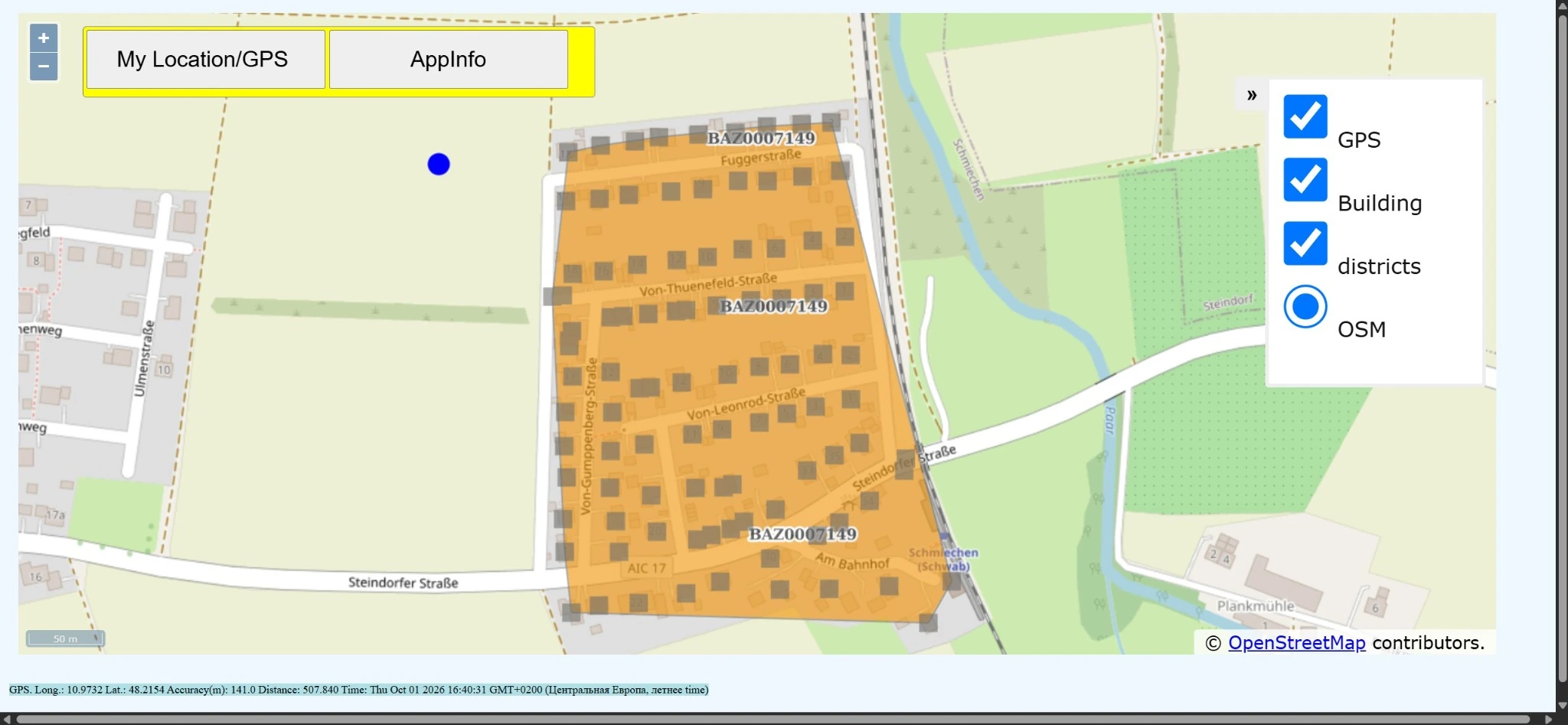
Before Route Engine
A fragmented process
- A static district map — unchanged on a phone
- A separate address list
- Manually chosen stop order
- Reliance on knowing the area
On the pd.KURIER routes I worked, the original process relied on a static district map and a separate address list. This describes the specific workflow used to validate Route Engine.
With Route Engine
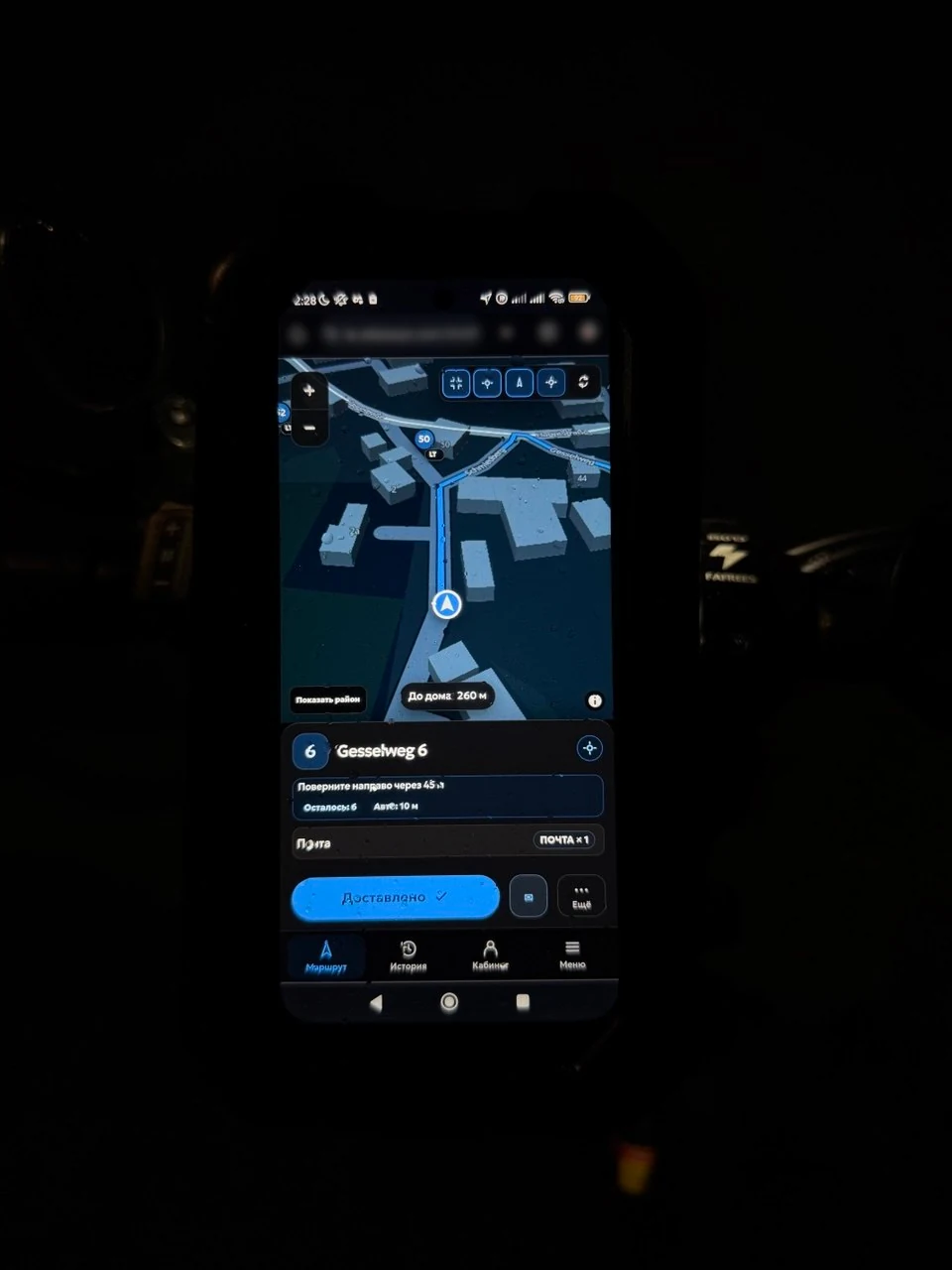
One R/ENGINE workflow
- 2.5D map and GPS navigation to the active address
- Recipients, cargo and actions beside the map
- An optimized stop sequence
- Voice prompts, progress and route continuation
The current version brings navigation and task completion together in a courier interface. Stop-sequence optimization helps reduce unnecessary travel while each stop’s details remain available throughout the shift.
ONE ENGINE. DIFFERENT CARGO.
Deliveries change.
The workflow stays.
Field use started with newspapers and mail. The stop model connects an address, recipients and delivery contents; it can be adapted to other cargo types and connected task sources.
- Parcels
- Documents
- Print & media
- Groceries
- Spare parts
- Retail goods
- Internal logistics
ROUTING FOR THE WAY YOU MOVE
On wheels.
Or on foot.
Stop order and paths are calculated for the selected transport profile.
- Walking
- Cycling
- Driving
My contribution
From a delivery problem
to my own product.
I saw where time was lost during my own delivery shifts, analyzed the process, designed a solution and validated it on the same routes.
Defined the workflow
Analyzed my own courier shift: addresses, recipients and delivery contents were disconnected. Defined requirements for one route and multiple recipients at the same address.
Built and released the product
Independently implemented import, optimization, navigation and delivery completion. Designed the interface with a 2.5D map, voice prompts and large controls for use on the move.
Validated in real delivery
Checked GPS, rerouting, completion and recovery during working shifts. Reviewed releases on iPhone and Android and measured route time.
Used in real operations across five delivery districts.
Reliability and field checks
GPS, heading, the path to the active address and rerouting are checked during real shifts.
Reload recovery, progress retention and switching devices are part of the workflow being validated.
Arrival and departure checks, stale-result protection and undo help control stop completion.
- Field checks on iPhone and Android cover navigation, shift recovery and progress retention.
Schematic route logic demo
This interactive schematic demonstrates navigation logic with fictional addresses. The video above shows the current interface with a 2.5D map.
Compact autonomous reconstruction of the working courier UI. All addresses, times and delivery data below are fictional.
Product delivery & process improvement
A process
worth improving?
Let’s discuss the task, the workflow and the result your business needs.